Setup
Five ways in. All of them create the same auto_router/complexity_router deployment.
Dashboard presets
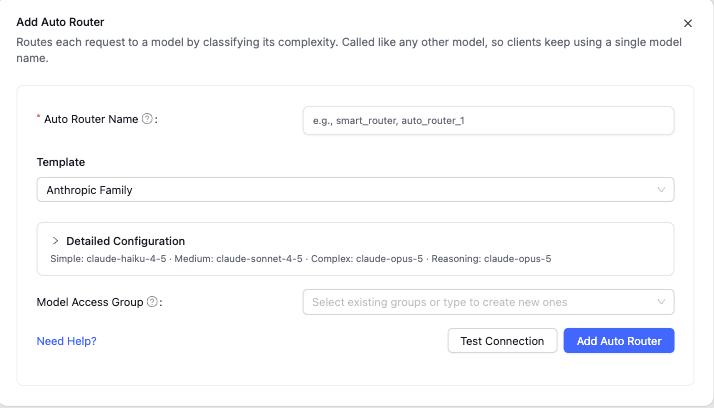
- Models + Endpoints, Add Model, Auto Router tab.
- Templates: 1M Context, Anthropic Family, OpenAI Family, Gemini Family, Lite. Each fills all four tiers from models your proxy already serves.
- A template whose models are not deployed is greyed out with the missing names listed.
- Test Routing sends one prompt through the classifier and shows the model it would pick. Nothing is created and the picked model is not called.
- Test Connection runs a minimal request per tier model group. Green means reachable with your credentials.
- Detailed Configuration holds the rest: keyword rules, LLM classifier and prompt, escalation keywords, adaptive pools.
The templates as config.yaml: Recommended Configurations. Release post: AutoRouter: 1 Click Deploy.
Agent skill
run curl -fsSL https://docs.litellm.ai/skills/auto-router and follow the instructions
- Reads the models your proxy already serves.
- Asks for the router name and a model per tier.
- States the defaults it is assuming before it writes anything.
config.yaml
model_list:
  - model_name: gpt-5.6-luna
    litellm_params: {model: openai/gpt-5.6-luna, api_key: os.environ/OPENAI_API_KEY}
  - model_name: gpt-5.6-terra
    litellm_params: {model: openai/gpt-5.6-terra, api_key: os.environ/OPENAI_API_KEY}
  - model_name: claude-sonnet-5
    litellm_params: {model: anthropic/claude-sonnet-5, api_key: os.environ/ANTHROPIC_API_KEY}
  - model_name: claude-opus-5
    litellm_params: {model: anthropic/claude-opus-5, api_key: os.environ/ANTHROPIC_API_KEY}

  - model_name: smart-router
    litellm_params:
      model: auto_router/complexity_router
      complexity_router_config:
        tiers:
          SIMPLE:    gpt-5.6-luna
          MEDIUM:    gpt-5.6-terra
          COMPLEX:   claude-sonnet-5
          REASONING: claude-opus-5
      complexity_router_default_model: gpt-5.6-terra
- Tiers name other
model_nameentries in the same file, so every tier is a deployment the proxy already knows. complexity_router_default_modelserves whenever the router cannot decide.- No
classifier_typemeans the heuristic scorer: free, no added latency. classifier_type: llmwith a small model raises accuracy on agent traffic for a fraction of a cent per request. See benchmarks.- Everything else (keyword rules, tier pools, session affinity, scorer tuning): configuration reference.
Model-management API
For CI/CD or scripts, create the same deployment with POST /model/new. Enable store_model_in_db first; Auto Routers are model deployments, so there is no separate /auto_router/new endpoint. This example uses the Anthropic Family preset; create the referenced model deployments first.
curl -X POST "http://localhost:4000/model/new" \
  -H "Authorization: Bearer $LITELLM_MASTER_KEY" \
  -H "Content-Type: application/json" \
  -d '{
    "model_name": "claude-auto",
    "litellm_params": {
      "model": "auto_router/complexity_router",
      "complexity_router_config": {
        "tiers": {
          "SIMPLE": "claude-haiku-4-5",
          "MEDIUM": "claude-sonnet-5",
          "COMPLEX": "claude-opus-5",
          "REASONING": "claude-opus-5-high"
        },
        "classifier_type": "heuristic",
        "escalation_keywords": ["LITELLM ESCALATE"],
        "session_affinity": false
      },
      "complexity_router_default_model": "claude-sonnet-5"
    }
  }'
The response includes model_id. Use it with PATCH /model/{model_id}/update for partial changes, and call the router by its model_name. Validate a complexity configuration before saving with POST /auto_router/validate_complexity_router_config. See Model Management for deployment CRUD and Configuration Reference for the full router payload.
Autorouter CLI
- Stands up a throwaway local proxy that forwards every request to your real proxy.
- Routes Claude Code traffic through it for the session. Nothing bypasses the real proxy and its config is untouched.
- Guide: Autorouter CLI.
Claude Code and Claude Desktop
- Claude Code populates its model picker from
/v1/modelsand keeps only names containingclaudeoranthropic. Name the router accordingly, or setANTHROPIC_MODELdirectly. - On Claude for Teams or Enterprise, the exact router name must be on the organization allowlist. The check runs client-side, so a rejected router leaves nothing in gateway logs.
- A router advertises no context window until you declare one in
model_info, and Claude Code applies its own default regardless. Both sides: context window. - Tutorial: Auto Router with Claude Code and Claude Desktop.